Short answer
How can you tell whether a Binance website or message is fake?
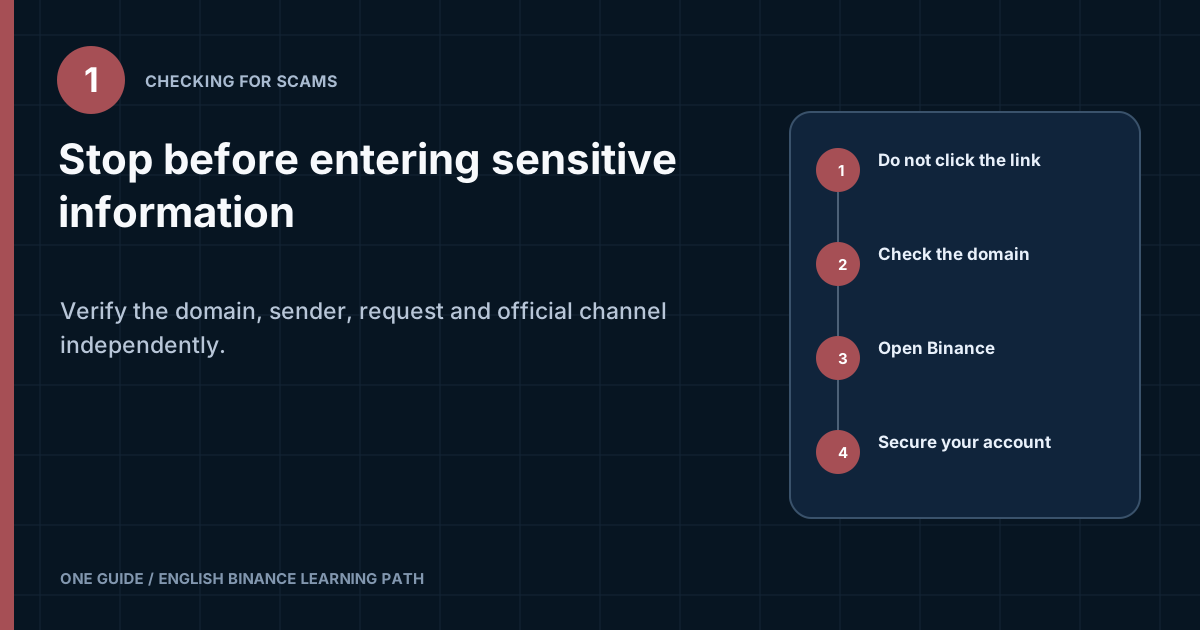
Do not act from the message you received. Close the link, open Binance through a previously verified bookmark or a manually entered address, and check whether the same event appears inside the account. Check the full domain, the sender's actual address, the meaning of the request, and the official contact through Binance Verify. Never disclose a password, current 2FA code, backup key, seed phrase, private key, remote access, or a transfer to a “safe address” to someone claiming to be support. [1] [2]
Claims that the account will be restricted within minutes, a fine is due, a hack has occurred, or this is the last chance are designed to prompt hasty action. Do not call the number in the message or use its button. First open the official account through an independent route.
What should you do before clicking a link?
Stop the current scenario and separate the message from the verification process. Do not reply, open an attachment, scan a QR code, or install the suggested app. Take a screenshot showing the date, sender address, and text, but conceal your personal data if you share it further.
- Identify the claimed eventIs it a login, withdrawal, security change, gift, job offer, or support contact? Specific wording helps you look for confirmation.
- Open Binance separatelyUse a saved bookmark, the official app installed from a trusted store, or an address you typed manually.
- Check the accountReview notifications, devices, security history, and transaction status. The absence of an event does not prove fraud, but it means you must not follow the demand blindly.
- Contact them through your own channelOpen support from the official website or app. Do not continue the conversation through the contact you are trying to verify.
This independence matters more than appearance. A scammer can copy a page, an employee signature, a profile photo, and the text of a genuine notification. It is harder for them to create the corresponding event inside your already open official account.
How do you check a Binance website address?
Read the address from right to left up to the domain boundary instead of looking for the word Binance anywhere in it. An address can contain subdomains, a path, and parameters. A fake page can place the brand name at the start of a long string even though the actual domain belongs to someone else.
| Address element | What it means | What to check |
|---|---|---|
| https:// | The connection to the selected website is encrypted | It is neither proof of ownership nor a sign of honesty |
| Name before the domain | It may be a subdomain or part of a deceptive string | Find the actual registrable domain |
| Look-alike characters | Latin letters, digits, and Unicode characters can look identical | Look for substitutions involving i/l/1 and o/0, and for the xn-- form |
| Path after / | Section within the site | The word binance in the path does not make the domain official |
| Search ad | Paid placement | A top position does not prove authenticity |
On a phone, tap the address bar to see the full address. Do not trust a shortened link, QR code, or correctly labeled button: the visible text and actual destination may differ. A bookmark saved in advance reduces the need to analyze an address during an alarming situation.
HTTPS and the padlock icon only indicate a connection to the domain you opened. An attacker can obtain a certificate too. Do not install a browser extension, APK file, or configuration profile from a page found through an ad or sent in a chat. The safe installation process is described in Binance download guide.
How do you check an email supposedly from Binance?
A display name is not enough. Expand the full sender field and, if the email service displays it, the reply-to address. A scammer can put “Binance Support” in the name, use a similar domain, or redirect a button elsewhere.
- compare the email with an action you have just initiated yourself;
- hover over the link on a computer, but do not open it merely to check it;
- do not enable macros or run an archive, executable file, or unknown document;
- check your personal anti-phishing code if you configured it in the account beforehand;
- do not treat error-free wording as proof of authenticity;
- do not forward a code from an email to someone who promises to cancel a transaction.
An anti-phishing code is useful only as an additional signal. If it is missing or incorrect, stop, but a correct code should not replace checking the domain and the request. If you disclosed the code to someone else, treat it as compromised and change the setting through your official account.
What should you do with an email about a withdrawal you did not create?
Do not click the cancel button in the email. Open Binance yourself and review the history, devices, API keys, and security settings. If the event exists, use the emergency process through official support and secure the linked email account. If it does not, save the message as suspicious and report it through an official channel.
Can you trust an SMS, Telegram message, or phone call?
A number, profile name, and avatar do not prove identity. The displayed number can be spoofed, and a similar account is easy to create in a messenger app. The other person knowing your name, phone number, or details of a previous transaction also does not prove that they can see Binance's internal system.
Do not add the person to a screen-sharing session, enable action recording, or allow control of the device. A one-time code remains secret even when the other person claims it is needed to cancel a withdrawal. If the caller insists that you stay on the line, contact the official channel separately from another device, or end the call and open support yourself.
It can open a phishing domain, request a login, connect a wallet, or offer an installation. First read the destination safely and do not confirm an action whose purpose you cannot explain.
How do you check an app, extension, or update?
An update should start from the already installed official app, a verified store, or a download page you opened manually. A banner in a messenger app, a file from cloud storage, and an APK from a search result do not become safe because they have the right-looking icon. Check the publisher, app history, permissions, and developer link.
On Android, do not enable installation from unknown sources to bypass regional restrictions. On iPhone, do not install an unknown enterprise profile. On a computer, do not add an extension that asks to read every page, the clipboard, or form data unless you can verify its purpose and publisher.
After installing a suspicious file, simply removing it may not be enough: the program may have preserved a session, extension, or remote-access tool. Disconnect the device from the network, do not enter new secrets, and check installed apps and startup items. Change passwords from another clean device, beginning with email and the financial account.
Can you check only the icon and download count?
No. Graphics can be copied, reviews can be purchased, and the counter may belong to another app with a similar name. Follow a chain from the official Binance page to the store, then check that the store has not redirected you to an ad or a similar listing.
What does Binance Verify check?
Binance Verify lets you check certain published contacts and channels against Binance's official records. Enter the email address, phone number, website, or social media account into a tool you opened independently. Do not use a copy of Verify linked by the person you are checking.
The result applies to the value entered, not to every claim made by the person. Even if a channel is listed as official, separately assess the specific request, context, and actions inside the account. A negative or missing result is a reason to stop, but does not replace contacting support in a serious incident.
What requests should you never carry out at the direction of support?
| Request | Why it is dangerous | Safe action |
|---|---|---|
| Disclose a password | Provides direct access to the account | Never disclose it to anyone; change it only on the official page |
| Dictate a 2FA code | May confirm a login or transaction | Enter information only into a form you opened independently |
| Send a QR code or backup key | Allows an authenticator to be cloned | Store offline and do not attach it to a ticket |
| Disclose a seed phrase or private key | Hands over control of the wallet | Never enter it on a support website |
| Install remote-access software | Opens access to the screen, files, and input | Refuse and remove the installed software from a clean device |
| Transfer to a safe address | The transfer may be irreversible | Stop the transaction and check the account |
| Pay a tax or unlocking fee | Creates the next loss | Check the genuine notification inside the product |
Support may need a transaction identifier, time, app version, and a screenshot of the error with secrets concealed. These diagnostic details are different from access factors. Before uploading an image, remove the password, one-time code, full identity document, address, and unnecessary balances.
What stories do scammers use?
Fake violation or restriction
The message threatens account closure and leads to a copy of the login page. After you enter them, the password and code go to the attacker. Check the status inside an account you opened independently, not through a “confirm now” button.
Gift, airdrop, or transfer doubling
To receive the promised amount, you are asked to send an asset, pay a fee, or connect a wallet first. Check the announcement through official channels and do not treat a repost from a well-known profile as proof.
Fake job or investment manager
Someone offers earnings, asks you to create an account, buy an asset, and follow instructions in a private chat. Withdrawals then require further payments. Do not hand over control of the account or treat a balance shown on a third-party website as real funds.
Recovery of stolen funds
After the first loss, a “specialist” may appear and promise recovery in exchange for an advance payment, tax, or access to the wallet. This may be a second stage of the scam. Submit the materials to the bank, platform, and applicable authorities, not to a paid intermediary from a private message.
P2P counterparty impersonation
The other party moves communication outside the order, changes payment details, or sends a fake receipt. Keep material actions inside the active order. The complete procedure is described in the guide to Binance P2P safety.
What should you do if you have already opened a phishing page?
What to do depends on exactly what happened. Do not ignore the incident or keep entering information just to test it. Record the time and address, then use a clean device to secure your accounts.
| What happened | First steps |
|---|---|
| Only opened the page | Close the tab, do not download anything, and check your downloads and extensions |
| Entered a password | Change the Binance and email passwords, end unknown sessions, and check 2FA |
| Entered a 2FA code | Treat the current transaction as compromised, review the history, and open support urgently |
| Installed a program | Disconnect the device from the network, stop logging in, and remove the threat using a verified plan or with help from a specialist |
| Granted remote access | End the session, remove the remote-access tool, check the device, and change secrets from another clean device |
| Sent an asset | Do not pay again; save the identifier and report it to Binance, the provider, and applicable authorities |
After a compromise, review devices, login history, 2FA methods, withdrawal addresses, API keys, and the linked email account. If the suspicion concerns the SIM card, contact the carrier through its official number. The step-by-step procedure is provided in Binance account-protection guide.
What evidence should you save, and where should you report it?
Preserve the original facts without further contact with the scammer. You need the full URL, sender address, profile name and identifier, time with time zone, the text of the demand, a transaction number or transaction hash, and screenshots. Do not publish passwords, codes, documents, or complete payment details.
Submit the materials to the official Binance support center that you opened independently. For a bank payment, contact the bank separately. If there is financial loss or extortion, use the local official crime-reporting channel. Recovery depends on the facts, network, payment method, and applicable procedures, so an outsider cannot promise it.
Frequently asked questions
Does the padlock icon mean the site is genuine?
No. It indicates an encrypted connection to the domain you opened. A fraudulent domain can use HTTPS too. Check the full site name and open the account through an independent route.
Can you reply to a suspicious email to check the sender?
A reply confirms that the address is active and continues the conversation in the attacker's channel. Do not reply. Open support through the official website or app and provide the original information there.
Binance Verify found the contact. Can I give them a code now?
No. The tool checks a published contact, but a one-time code, password, backup key, and seed phrase remain secret. Analyze the request separately.
The email contains my anti-phishing code. Is it definitely genuine?
It is an additional positive signal if the code matches the one you set in advance. It does not replace checking the domain, the event in the account, and the link's purpose, especially if the code may have been exposed earlier.
The employee knows my UID and a previous amount. Is that proof?
No. That information could have come from a leak, a public screenshot, or earlier correspondence. Continue only through an official channel you opened independently.
Can cryptocurrency that has already been sent be recovered?
Do not assume an automatic recovery. Save the transfer details immediately and contact the platform and applicable authorities. Do not pay anyone who guarantees recovery in exchange for an advance payment.
Official sources to check
Sources checked on August 8, 2026. Open contacts and warnings independently, not through the message whose authenticity you are checking.