Short answer
What should you do if a Binance code does not arrive?
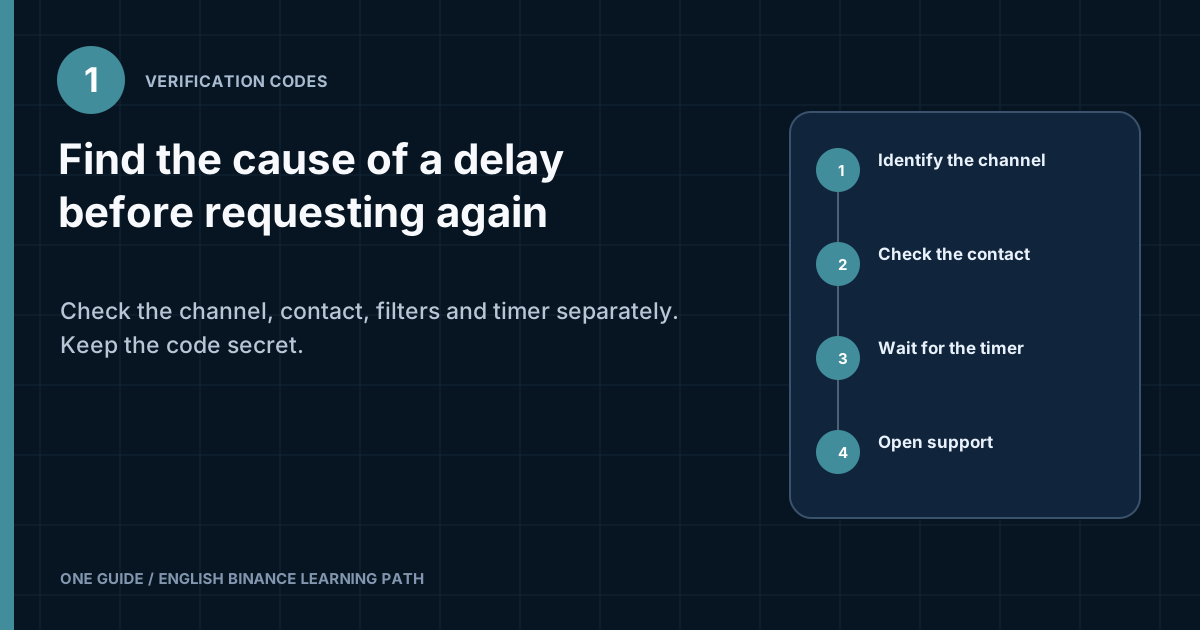
Do not send a series of new requests. Check which code the current screen asks for: email, SMS, or TOTP from an authenticator app. Then verify the masked contact, wait for the timer to end, and address the cause only in the relevant channel. For email, check delivery, filters, and mailbox security; for SMS, check the connection, number, and operator restrictions; for TOTP, check automatic date and time, the correct Binance entry, and access to the authenticator. If the contact method is lost or the screen shows an address that is not yours, proceed to official recovery instead of trying to guess the code. [1] [2]
Your password, email code, SMS code, 2FA app code, backup key, and recovery codes provide access to your account. A support representative does not need a current code. Do not enter it in a form linked from an unexpected email or show your screen to someone offering help in a messenger app.
How do you tell where the code should come from?
Read the field label and the hint beside it, rather than the word “code” in isolation. The system may request several independent confirmations. An email code is delivered by the email service, an SMS code by the mobile operator, and a TOTP code is generated locally by an authenticator app. The last one is not normally sent as a message and can work without a mobile network.
Look at the partially masked address or number. It should match the contact linked to your account. If you see an unfamiliar email address, a different country code, or the last digits of someone else's number, stop. You may have entered the account details incorrectly, signed in to the wrong account, or had settings changed by someone else. A new request will not correct the wrong destination.
| What the field says | Where to find it | What to check first |
|---|---|---|
| Email verification code | In the inbox of the linked email account | Masked address, search, spam, and email-processing rules |
| SMS verification code | In messages on the linked phone | Country code, last digits, network connection, and receipt of service SMS messages |
| Authenticator code | In the Binance entry in the 2FA app | Correct entry and automatic date, time, and time zone |
| Passkey or security key | In the device's system prompt or on the physical key | Selected device, Bluetooth or USB, and whether a passkey is saved |
Method names may vary with the app language, region, and interface version. Use the verification type and masked contact details as your guide. Do not substitute a code from another channel simply because it also consists of digits.
How do you diagnose the problem by symptom?
One observable symptom usually narrows the possible causes faster than resending the code. Record whether a sent confirmation appears, whether the timer changes, whether the code arrives late, and exactly what the form says after you enter it.
| Symptom | Likely cause | Next safe check |
|---|---|---|
| The timer started, but no email arrived | Email delivery or filtering | Search all folders by time and sender, then check rules and available storage |
| The email arrives after several requests | Delivery delay | Use only the newest message; do not try old codes one after another |
| SMS messages from other senders arrive, but messages from Binance do not | Service-message filter or routing restriction | Check phone blocks and ask the operator about receiving short-code or international SMS messages |
| The TOTP changes, but the form rejects it | Device time or the wrong entry | Enable automatic synchronization and confirm that you selected the correct Binance account |
| The screen shows an old contact method | Loss of a verification method | Open the official reset or recovery process |
| Codes stopped working after a suspicious sign-in | Possible account takeover | Secure your email account and device, then start recovery from the official website |
Do not try to guess in advance whether a restriction is temporary or how long it will last. Retry intervals and system messages change. The current timer and error message take precedence over numbers in an old guide.
What should you check if a Binance email does not arrive?
Check the chain from the destination address through the mailbox's own rules. A successful press of “Send” means the interface accepted the request, but it does not prove that the email reached the inbox.
- Check the masked addressMatch the visible letters and domain to the email address you believe is linked. If the hint does not match, do not make new requests.
- Search the entire mailboxCheck Spam, Promotions, Notifications, the archive, and Trash. Search by request time and the word Binance, but assess the full address and message content before following links.
- Check the rulesAutomatic forwarding, sender filters, deletion rules, and corporate gateways can move a message without notifying you. Check the rule log if your email service provides one.
- Check storageA full mailbox may stop accepting new messages. Free up space using the provider's standard tools and wait before making one new request.
- Distinguish a delay from a complete failureSend yourself an ordinary test email from another personal address. This checks general delivery, but does not prove that the specific service-message route works.
- Secure your email accountReview active sessions and security events with the email provider. If you find an unknown sign-in, change the unique password from a clean device, terminate other people's sessions, and enable separate 2FA for email.
Do not allowlist an address copied from a forum or someone else's email. A scammer can spoof the display name and suggest an “official sender.” If Binance publishes a current list of domains or addresses, open it through the official support center after typing the domain yourself.
Why does an old email arrive but its code is rejected?
After a new request, the previous code may no longer match the current operation. Sort emails by their actual receipt time, open the newest one, and confirm that it relates to the action on screen, such as signing in, changing security settings, or confirming an operation. Do not enter a code from an email for one operation into the field for another.
If several messages arrive in one batch, close the current process and start again only after the displayed restriction has ended. This gives you one clear screen-and-message pair instead of a queue of codes in an uncertain order.
What should you do if an SMS from Binance does not arrive?
First confirm that the linked number still belongs to you and receives service messages. Having mobile internet access does not prove that the phone can receive SMS messages. The phone may work over Wi-Fi while the SIM is not registered on the operator's network.
- Compare the country code and visible final digits of the number on screen.
- Turn off airplane mode, check the signal strength, and restart network registration.
- Check the blocked folder and settings for filtering unknown senders.
- With two SIMs, check which card is active and whether the required number is roaming.
- Ask the operator whether it blocks short-code, automated, or international service messages.
- Do not move the SIM to someone else's phone or give another person control of your screen for “diagnostics.”
If the number was recently ported to another operator, the SIM was replaced, or service was restored after a loss, treat the issue as a security event. Contact the operator through a verified channel and confirm that no duplicate SIM was issued without your consent. Then check your email, password, and Binance devices.
Even if such a number received the first code, access to it may disappear. Do not use a temporary number for a financial account or try to use one to bypass regional requirements. If you have lost the old number, use the official process for changing the verification method.
Why is the code from the 2FA app not accepted?
A TOTP code is normally generated on the device, so waiting for an SMS or email will not fix it. It depends on the linked secret and accurate time. Open the authenticator app, find the entry for Binance and the correct account, then enter the current code before the indicator changes.
- Enable automatic date, time, and time zone settings on the device.
- If the app offers code time synchronization, use its built-in function.
- Check the entry name and account, especially if you have several Binance profiles.
- Do not delete the 2FA entry in the hope of linking it again. Without the original key, this may remove your only working sign-in method.
- Do not scan a new QR code sent by someone in a chat. Link an authenticator only from the official account's security settings.
After moving to a new phone, check whether the entry was actually restored or was created again with a different secret. An identical label does not mean an identical link. If you no longer have the old device or backup key, select the unavailable-verification-method option on the official screen and complete the account-ownership check.
When can you request another code?
Only after the current timer ends and you have checked the channel. Frequent requests create several messages, make it harder to identify the current code, and may trigger an additional restriction. Do not refresh the page during the countdown unless the interface itself prompts you to do so.
A safe cycle is one request, a check of the required channel, a wait for the displayed interval, and one retry. If the system reports a limit, save the exact wording and stop trying until the time shown on the screen. Do not switch VPNs, browsers, devices, and networks after every rejection. Those changes do not fix delivery and may add unusual sign-in signals.
Should you try every code you received?
No. Use only the newest code for the current action. Keep old messages as a timing log, but do not try their digits one after another. If you cannot tell which message is newest, end the process, wait for the restriction to expire, and make one new request from a verified screen.
How do you make sure the real Binance is requesting the code?
Open Binance yourself instead of using a link in an “urgent account lock” message. Check the full domain in the address bar, the secure connection, and the app publisher. A bookmark to an address you verified in advance is safer than a search advertisement.
Binance Verify helps you check published official contacts and channels, but it does not make every message bearing a logo authentic. A sender name, avatar, messenger number, and ID screenshot are easy to copy. Support should not ask for your password, a current code, backup key, seed phrase, private key, remote-access installation, or a transfer to a “safe address.”
If a code arrived without your request, do not use it or reply to the sender. Open your account from your own saved address and review active devices and security history. Then secure your email account and change the password if there are signs of an unknown sign-in attempt.
What should you tell official support?
Provide diagnostic facts, but no secrets. Open support through the official website or app. Provide the code type, approximate time of the last request with the time zone, whether the masked contact is correct, the device and app or browser version, and the exact error message. Save the case number separately.
| Safe to disclose through an official channel | Never disclose |
|---|---|
| Verification type and error message | Account or email password |
| Request time and device model | A current one-time code |
| Partially masked contact from the screen | 2FA backup key or QR code |
| Existing support case number | Wallet seed phrase and private keys |
If the contact method is no longer available, the problem is no longer about delivery. Continue to account recovery. If codes started arriving after actions you do not recognize, first follow the emergency steps in the account security guide.
Frequently asked questions
Can I request the code at another email address?
On the sign-in screen, the code is normally sent to the contact method already linked to the account. Entering another address in a random form does not change your account settings. If you have lost access to the email account, use the official reset or recovery process and be ready to prove account ownership.
Will a VPN help receive an SMS?
A VPN changes the device's network route, but not the mobile operator's message-delivery route. Frequent IP address and region changes may complicate the sign-in assessment. Check the number, connection, and operator restrictions instead of masking your location.
Why does an authenticator code work without internet access?
TOTP is calculated on the device from a stored secret and the current time. The app or website may need internet access for sign-in, but not to generate the code itself. A time error can therefore make every code invalid.
Can I send support a screenshot of the email?
First hide or crop out the code itself, the address, the case number, and other unnecessary data. Send the screenshot only through an official secure channel and only if it is needed for diagnostics. A public forum is not suitable.
A code arrived without a request. Has the account already been compromised?
The message alone does not prove a successful sign-in, but it indicates an attempted action involving your contact details or account. Do not enter the code or follow links in the message. Check your email account, devices, and Binance security through an official address you opened yourself.
Official sources to check
Sources checked on August 8, 2026. Confirm available methods, restrictions, and button labels against the current screen in your account.