How do you register safely on Binance?
First confirm that the service and required features are permitted where you actually live. Then follow the ONE GUIDE invitation, create a personal account with your own email or phone, check BNW01 before submitting the form, confirm the contact, and complete only the checks shown by Binance. Before adding money, enable a strong second factor, save a recovery method, and check the device list.
If the country, document, phone number, or link source raises doubts, it is better to stop registration. Bypassing regional restrictions, using someone else's documents, and entering a random invite code create problems that are harder to correct after the account is created. [1] [2]
Registration does not mean you must buy an asset immediately. This article explains account creation and security but does not recommend a currency, transaction timing, or investment amount. Do not use borrowed money or deposit an amount whose loss would disrupt your budget.
Who this guide is for and when not to continue
This route is for an adult creating a personal account for themselves, acting in their own name, and wanting to understand every stage before confirming. It is useful if this is your first centralized cryptocurrency exchange, you are concerned about fake sites, or you want to understand in advance where the referral code appears. It also suits someone who has opened the form but has not yet submitted data and wants to check the sequence.
This is not a guide for a corporate account. Registering an organization normally requires another profile category, company documents, and information about owners and representatives. Do not select personal merely because it looks shorter. A mismatch between the actual owner of funds and account type may lead to additional checks and transaction restrictions.
When to close the form
Do not continue if you are creating the account at the request of an unknown “analyst,” an employer or recruiter who contacted you through a messaging app, a romantic contact, or someone promising to manage the money for you. The scheme often starts without requesting a transfer: the victim is asked to register, share the screen, disclose a code, or install remote-access software. The attacker may prepare an account takeover at this stage.
Registration is also not a way to bypass a prohibition in your country. Do not select a fictitious residence, use someone else's number, or upload a relative's document. The data must belong to the account holder and reflect the actual situation. If Binance reports unavailability, stop and check local rules instead of seeking a technical workaround.
Separately consider why you need the account. If you only want to explore the interface, first read educational materials and view public fee pages. If you need a specific feature, check its availability before registration. An account-creation form does not guarantee that bank transfers, P2P, specific assets, or withdrawals in a selected currency are available in your region.
What a safe result looks like
Safe registration does not mean there is no risk. It means the account holder understands which service they are opening, what data they are providing, how they will recover access, and when to stop if something does not match. Even a properly created account can be lost through phishing, a reused password, an infected device, or disclosure of a code. The result of this article is therefore a protected account with no funds in it, not a completed purchase.
Do not treat registration as urgent because of an advertising timer. A referral promotion, bonus, or promised discount should not make you skip terms and security. Invitation terms should appear in the registration form. If they disappear before submission, pause and do not register blindly.
It helps to decide in advance that no one will control the process during a call. Help may explain general concepts, but the password, code, document, and final confirmation remain with the owner. Someone who becomes angry when you pause or asks you to hide the screen from people close to you is not a safe helper.
- You may continueYou understand the purpose, act independently, use your own data, and see confirmation of availability in the Binance interface.
- PauseYou are unsure about regional rules, the account type, the document, the link source, or the invitation terms.
- Close the pageSomeone asks for a code, password, remote access, or a transfer for “activation,” or guarantees a profit after registration.
How to check Binance availability and local requirements
The short answer: first check whether you may legally use the required service in your jurisdiction. Binance may have separate regulated platforms, regional terms, and different product ranges. The home page, help center, documents, and actual form may show different options depending on the country. [1] [3]
Start with the Binance Terms of Use and legal section. Find the applicable company, restricted territories, age requirements, and user obligations. Do not rely on an old blog review, a video showing someone else's interface, or a partner's message. Rules can change, and a third-party author does not know your residence status, citizenship, or tax obligations.
Then list the features you actually need. For one user, that is only custody and Spot trading; for another, a bank-transfer deposit; for a third, withdrawal of a cryptoasset to an external wallet. Check each feature separately. General registration may be open while a payment method or product is unavailable. Do not substitute a VPN connection for an availability check. The technical appearance of a button does not create a legal right to a service or change your place of residence. The platform may request proof of address, source of funds, or additional information. Inconsistent data complicates verification and access recovery.
If you live in a country where regulation changes quickly, keep the date of your check and a link to the applicable terms. You do not need to take hidden screenshots of your account or publish personal data. It is enough to record which legal section you opened, which feature you checked, and what decision you made. This note helps prevent old advice from being confused with current terms.
ONE GUIDE does not determine your legal or tax status. When the consequences matter, consult an independent professional in your country. The Binance website may explain platform terms, but it does not replace local legal advice. Be especially cautious of promises of “completely anonymous” registration: a regulated exchange may require identification and verification of the source of funds.
Minimum checks before the form
- Identify your actual country of residence and do not change it to access a feature.
- Open the current terms and risk warning on the Binance page.
- Check whether the required deposit, trading, and withdrawal methods are available.
- Determine whether you need a personal or corporate account.
- If the answer is unclear, do not deposit funds until Binance support clarifies it.
What to prepare before registration
Preparation reduces error risk and does not require sending documents in advance. You need a personal email address or phone, a trusted device, a stable connection, and unhurried time. If the platform offers identity verification, the document must belong to you, be valid, and meet the requirements shown for the selected country.
It is sensible to use a separate email address for a financial account. Do not publish it in listings, social networks, or directories. Protect the mailbox with a unique password and its own second factor before creating a Binance account. If an attacker controls the mailbox, they can see notifications, initiate recovery, and confirm some actions.
Your Binance password must be unique. Do not copy a password from your email, bank, marketplace, or an old exchange. Length and randomness usually matter more than a complex but predictable substitution of symbols for letters. A password manager helps generate and store a value you do not need to memorize or send to yourself in a messenger. Decide in advance which second factor you can recover. An authenticator app does not depend on SMS delivery, but requires careful storage of the backup secret or recovery codes. A hardware key resists many remote attacks, but must be protected physically and should have a backup method. SMS is better than a password alone, but the number may be vulnerable to SIM replacement and loss of access.
Update the operating system and browser. Remove unknown extensions, especially those promising automated trades, bonuses, or website changes. Registration does not require remote-control software. Do not use a shared computer, a work device administered by someone else, or open café Wi-Fi. The screen, clipboard, and notifications on such a device may be accessible to others.
If identity verification is planned, prepare a place with even lighting and an undamaged camera. Check that the name, date of birth, and country will be entered as shown in the document. Do not edit the document image, cover fields, or apply filters. Do not upload the file to the cloud or a third-party “verification service”; submit it only through the Binance form when it requests the document.
| What to prepare | Why it matters | What to avoid |
|---|---|---|
| Separate secure email account | Notifications, verification, and recovery | Shared family or company mailbox |
| Unique password | Reduces the risk of reusing leaked credentials | Email or phone password |
| Second factor and backup | Protects sign-in and sensitive actions | Storing the backup beside the phone |
| Personal document when requested | Confirms the holder and jurisdiction | Someone else's, expired, or modified file |
| Clean, trusted device | Reduces the risk of data interception | Remote access and unknown extensions |
How to recognize a fake registration form
After following the ONE GUIDE invitation, continue registration in the form that opens. Do not open advertising, email, or direct-message links in parallel or copy your password or one-time code into them. This makes it easier to avoid mixing the current process with a fake page.
Stop if the browser reports an insecure connection, unexpected redirect, or certificate substitution. The padlock beside the address means only that the connection is encrypted; it does not by itself prove who owns the page. Do not install an extension “for secure registration” or allow screen control.
The normal registration sequence consists of clear actions: entering a personal contact, reading the terms, confirming email or phone, creating a sign-in method, and, where required, verifying identity. Transferring money for “activation,” connecting a third-party wallet, entering a seed phrase, installing remote-access software, or sending a document through a messenger are not part of account creation. Stop if such a request appears before the form is complete.
If the connection is interrupted, do not continue through a link in an email or chat. Close unnecessary tabs, return to the invitation in the first step of this guide, and start again. Before submitting, recheck the selected country, your email address or number, the BNW01 code, and the terms. Do not publish a screenshot of the completed form: it may contain contact details, a name, session identifiers, and other data sufficient for a targeted attack.
A QR code is also an ordinary link. Do not scan a code from Telegram, a video, an email, or printed advertising during registration. If a message claiming to be from support moves you to a separate chat and asks for your password, code, authenticator backup key, or seed phrase, end the conversation and open Binance support from your account.
A fake form may accept any data, then show an error and move the user to a chat. If you entered a password on a questionable page, do not keep experimenting. From a trusted device, change your email and Binance passwords, terminate unknown sessions, check the second factor, and contact Binance support.
Do not enter data after an unexpected redirect. Return to the ONE GUIDE invitation step and reopen registration.
Which should you choose: email, phone, Google, or Apple?
Choose the option you can recover independently several years from now, not simply the fastest one. Binance may offer email, a phone number, or sign-in through an external account. Available methods depend on the region and page version. Every option ties access to another system, so secure that system first.
Registration by email
Email is convenient when the address was created specifically for financial services and protected by a separate second factor. It is easier to keep the same address when changing mobile operators. Risk arises when the mailbox has long been used everywhere, the password is reused, or email recovery depends on a phone number you have already lost.
Check the address spelling before submitting. A one-letter error can send the code to someone else or leave you unable to confirm. Do not forward the code email or show the screen to someone “helping you register.” Enter the one-time code only in the open registration form.
Registration by phone
A phone number is convenient when it is registered to you, works reliably, and is not due to change. Check the country code and number before requesting an SMS. Temporary numbers, virtual SMS-receiving services, and someone else's SIM create a risk of lost access. The operator may discontinue the number, and a new owner may receive messages after reassignment.
Even if you registered with a phone number, do not make SMS your only layer of protection. After creating the account, add a more resilient available factor and secure your mobile-operator account. A SIM PIN and a block on remote SIM replacement, where supported by the operator, reduce part of the risk.
Sign in with Google or Apple
External sign-in reduces the number of passwords but transfers a critical dependency to your Google or Apple account. Check its second factor, device list, and recovery methods. Make sure you understand which address Binance will receive, especially if Apple offers to hide your real email address. Record this choice in your password manager so you do not create a second account through another method a month later.
Do not mix methods at random. If you see an empty new profile after registration, you may have opened another account through a different email or external sign-in. Do not deposit until you identify which profile belongs to you and passed verification. Binance support can explain the process but should not ask for your password.
Step-by-step registration through the invitation
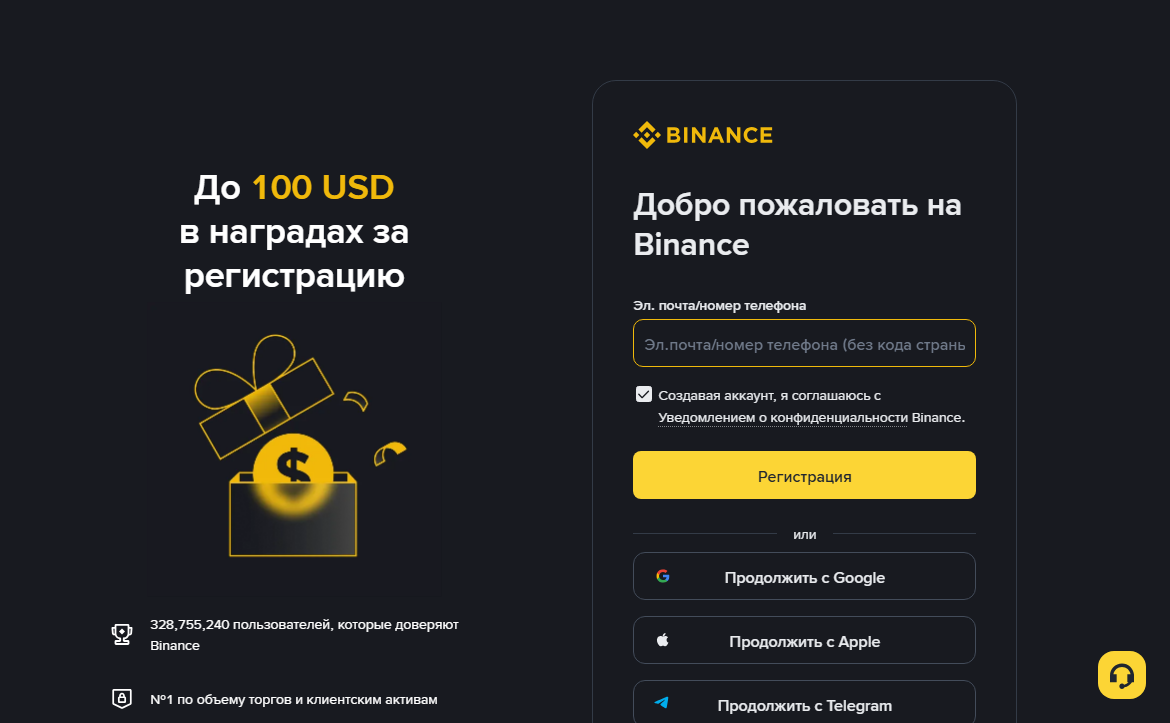
Labels change, but the logic remains similar. The platform first asks for the region and account type, then obtains and confirms a contact, creates the account, and offers subsequent checks. Do not search for an exact button color in advance. Compare the meaning, address, and data on every screen.
Do not confirm the form immediately after receiving the code. Return to the top of the screen and compare three things again: your actual country of residence, selected contact, and invite-field status. Correcting a typo before submission takes a minute; recovering a profile created with someone else's number or the wrong address may require a separate ownership check.
Read the main button's label and the text beside consent checkboxes. A checkmark does not confirm a promise in an advertisement; it means consent to the documents linked by the current form. If a promotional banner mentions a reward, record the condition separately and do not treat it as part of your balance until it appears in the account. A bonus does not offset the risk of using an unavailable product or giving data to an intermediary.
After pressing the button, wait for one clear result. If the account opens, record the sign-in method and proceed immediately to security settings. If an error appears, save its exact wording without personal data and correct only the stated cause. Several consecutive registrations with different contacts are not diagnostics and may complicate recovery.
- Start registration through the ONE GUIDE invitationFollow our invitation link and start registration with the code BNW01. If the program terms apply to your account, the trading-fee discount may be up to 20%. The exact amount and eligibility appear in the registration form before completion.Affiliate link: ONE GUIDE may receive a reward. Cryptocurrency trading involves risk; this material is not investment advice.
- Check the country and applicable serviceState your actual place of residence. Read any message about availability and transfer to a regional platform. Do not select another country to obtain a desired button.
- Select a personal accountThis option is for an individual acting for themselves. Use the corporate process for a company. Do not create a profile in the name of an employee, relative, or acquaintance.
- Choose your primary sign-in methodUse a secure email account, personal phone number, or your own external-provider account. Check every letter and the country code. Record the selected method in your password manager.
- Read the agreements before consentingOpen the terms, privacy policy, and risk warning. Pay attention to age, restrictions, data processing, and responsibility for decisions. Ticking the box should not be a mechanical action.
- Check the invitation fieldIf you intend to use a referral relationship, expand the relevant field and make sure the code or identifier appears before submission. Do not take a promised percentage on trust; read the actual term in the form.
- Confirm the contact with a one-time codeRequest the code once, wait for the message, and enter it only in the open registration form. Never disclose the code by voice, in chat, or through screen sharing. Support does not need it.
- Create a unique password if the form requests oneUse your password manager's generator and save the entry immediately. Do not paste the password into an unprotected note or photograph the screen.
- Check the final profileAfter signing in, confirm that the email or phone is displayed correctly and there is one account. Do not proceed immediately to a deposit. Open Security and complete the protection settings.
Some forms create a password later or offer a passkey. This is a normal interface change if you remain in the registration process you started and understand the selected method. A passkey may resist phishing better, but recovery depends on the device and cloud account. Before enabling it, check where the key is stored and whether a backup access method exists.
After every transition, watch for unexpected requirements. Registration should not require a cryptocurrency transfer to a “verification address,” payment of tax before account creation, or installation of a third-party wallet. Never send a seed phrase: a centralized Binance account and your self-custody crypto wallet are different systems.
If the form reloads or you are unsure whether the profile was created, do not click everything. Open Binance sign-in and try the same method. A message that the contact already exists may mean the account was created. Recovery is safer than registering again with new details.
How the invite code works and what to check before submitting the form
The BNW01 code links registration to the ONE GUIDE invitation. For users eligible for the program terms, the trading-fee discount may be up to 20%. The exact percentage and eligibility depend on the terms shown in the registration form.
After following the invitation, the code is normally entered automatically. Check the field before creating the account: adding or replacing the code after registration may be impossible.
ONE GUIDE may receive an affiliate reward if you register through the invitation. This does not increase the cost of registration and is not a recommendation to buy cryptoassets. You may read the guide without creating an account.
What happens during identity verification
Identity verification connects the account to a real person and helps the platform meet requirements for combating financial crime. Specific fields, documents, and the sequence depend on jurisdiction and profile type. Do not use an old video as an exact template. Follow the current Binance interface. [1] [3]
Verification normally includes basic details, a document image, and confirmation that the person is present. The platform may request an address, tax information, a questionnaire about intended use, or additional documents. A request alone does not indicate a problem. It must appear within the Binance process and match the published policy.
Enter your name and date of birth exactly as shown in the document. Do not translate or shorten your name arbitrarily unless the form instructs you to do so. If the document has several spellings, use the one required by the interface or ask support before making repeated attempts. The image must be legible, without glare or cropped edges. Do not edit the color, reconstruct the background, or cover the number. Do not also send the document through Telegram or email to someone claiming to be a reviewer. The process must take place in the app or a secure Binance form.
The face check requires a camera and sufficient light. Remove headwear or glasses if prompted and follow the instructions. Do not use another person's screen recording, an edited video, or a relative's document. An attempt to bypass the check may cause rejection and complicate a later case.
If verification is rejected, read the reason and correct only the stated problem. A series of rapid retries with different data may appear suspicious. Check the document, lighting, camera permission, and connection. For an unclear error, open Binance support from your account.
Keep as few document copies as possible. Do not leave one in a shared computer's Downloads folder, messenger history, or an open cloud directory. After successful submission, delete the temporary local file if it is not needed for lawful recordkeeping, and check device backups. Identification does not turn an exchange into a risk-free bank account. It serves another purpose. Asset price, operational risk, phishing, network errors, and possible restrictions remain. After verification, secure the account separately and learn how deposits and withdrawals work.
What data you provide and how to reduce unnecessary disclosure
Registering a financial account involves personal data. Contact details, identity information, device technical data, and activity history may be processed under the current privacy policy and applicable requirements. Before consenting, read who controls data in your jurisdiction, the purposes for which it is used, and the rights available to users.
Data minimization does not mean entering incomplete or false information. It means providing required information only through the Binance process and avoiding unnecessary extra copies. If the form requests a field, read the explanation. If someone asks for the same data through a messenger or video call, do not send it; open support yourself.
Keep your public profile separate from your account. Do not post your sign-in email in a channel, comments, or P2P listings. Your phone number, user ID, and transaction history are also not publication material. The fewer connections between your name, contacts, and financial account are publicly available, the harder it is to prepare a convincing targeted attack. Screenshots often disclose more than expected. Besides the balance, they may show your name, masked email, QR codes, addresses, notifications, asset list, and transaction identifiers. Before sending a screenshot to Binance support, use the built-in secure channel and retain only information needed for the specific issue. Do not publish it in an open chat for quick advice.
Do not store the document and selfie beside password exports or backup codes. If uploading required a temporary file, check Downloads, Trash, cloud sync, and automatic albums. Deleting a local copy does not cancel lawful platform retention, but it reduces the places where the file may be exposed accidentally.
Review app permissions after installation and registration. Camera access may be needed for identification, but permanent microphone, contact, or photo access should be assessed against the actual feature and operating-system settings. Do not grant permission merely because a window appeared. Read the purpose first and choose a limited option if it can complete the task.
Third-party accounting services, bots, and portfolio apps may request account or API access. Registration does not require such a connection. Every external service adds another party that receives data or authority. A beginner is safer keeping a simple local log without secrets until they understand the difference between viewing, trading, and withdrawal permissions in an API. To exercise a right to access, correct, or delete data, start with the Binance policy and support. Do not pay an intermediary promising to “clear KYC” or delete blockchain history. A record on a public network usually cannot be erased at an exchange's request, and regulated-data retention rules may limit immediate deletion. Identify the specific object and applicable process.
When you lose a phone, assess every linked channel, not only the Binance account. Block the SIM, terminate email sessions, revoke the device's access in Google or Apple, then recover the second factor through the Binance process. This sequence closes routes an attacker could use to approve recovery in your name.
How to secure the account before the first deposit
The best time to add protection is before money appears. After registration, open the security section through your profile, not an email link. Item names may change. Look for a second factor, passkey or security key, device list, sign-in activity, anti-phishing code, and withdrawal-address management.
Second factor
Add a method different from the only way to recover your email. An authenticator app creates one-time codes on the device. A hardware key or passkey adds protection tied to a physical device or cryptographic key. Keep SMS as an additional barrier rather than the only one when stronger options are available.
During setup, save the backup secret or recovery codes as recommended by the current interface. Do not photograph the QR code with a camera that automatically uploads to a shared cloud. Do not store the secret beside the password on the same phone. Think through recovery: could you sign in after losing the device, number, and email access?
Devices and sessions
Review authorized devices and activity history. For a newly created account, the list should make sense. An unfamiliar model, country, browser, or time means you should stop. Terminate extra sessions, change the password from a trusted device, and check your email. IP geolocation is not always exact, but an unexplained combination of signs must not be ignored.
Anti-phishing code
If available, set a phrase that will appear in Binance messages. It helps distinguish some genuine emails from mass forgeries, but it does not replace checking the context. Do not use a password, security question, or common word. Change the code if an outsider learns it.
Withdrawal addresses and API
An address allowlist can restrict withdrawals to recipients you checked in advance. It is useful when you regularly send to your own permanent wallets, but requires careful updates. Do not add an address from a “support” message. Beginners do not need API keys. Do not create them for a bot, signal, or unknown service connection.
Protecting email and phone
Binance security ends where a compromised mailbox begins. Check forwarding rules, recovery addresses, active sessions, and apps with email access. Ask your mobile operator about protection against unauthorized SIM replacement, if available. Do not publish the number linked to financial accounts.
Checkpoint before adding money
- The password is unique and saved in a password manager.
- The second factor is enabled and the backup is stored separately.
- Email and external sign-in are protected by their own second factor.
- The device list contains no unexplained entries.
- The anti-phishing code is configured, if the feature is available.
- There are no API keys unless you intentionally use them.
- No one has remote access to the device.
How to sign in safely for the first time
The first sign-in is for checking account control, not making a trade. Close unnecessary tabs, turn off screen sharing, and sign in through the bookmark. Check which verification method is requested and whether it matches your choice. Do not approve a phone notification unless you initiated the sign-in.
Open the profile and check the masked email address or number. Even hidden characters should match your record. Check the country and account type. If the details do not match, do not try to “fix” the situation with a deposit. Sign out and contact Binance support.
Explore the asset sections without making a transfer. Different balances do not mean different blockchain wallets. The exchange may separate funds by purpose, such as Spot or other products. An internal transfer between sections is not the same as an external blockchain withdrawal. It is important to understand this difference before the first operation. Find sign-in history and notification settings. Notifications help only if you know how to respond. Do not follow an alarming email link. For an unexpected message, open the app yourself, review activity, terminate an unknown session, and change the password if necessary.
Test signing out and back in while the balance is empty. Make sure you know where to obtain the second factor and how the password manager works. Do not test recovery by intentionally losing access, but confirm that a backup exists and is not stored with the device.
Do not enable margin, futures, or lending products out of curiosity. They are unnecessary for a basic Spot route and add risk. The interface may offer bonuses, tasks, and advanced sections. An offer does not make a product suitable.
End the session on a shared or temporary device and do not use that device again. On a personal computer, do not select permanent sign-in if other people use it. A screen lock, disk encryption, and system updates are part of protecting a financial account.
Why registration fails and what to do
The code does not arrive by email
Check the address spelling, Spam and Promotions folders, mailbox space, and filtering rules. Wait until another request is allowed. Do not send dozens of requests in a row; this may trigger a restriction. Confirm that the email is expected because of your own action in the registration form.
SMS not arriving
Check the country code and number, network availability, and operator blocks on service messages. Restart the phone only after saving the current step. Do not use an online SMS-receiving service. If the number was ported between operators or recently replaced, ask the operator about restrictions.
The contact is already in use
First try recovering the existing account. The profile may have been created earlier or registration may have completed during a previous attempt. Do not create a chain of accounts on different addresses until you understand the first one's status. If you do not recognize the account, report it to Binance support.
The page is unavailable in the region
Do not bypass the message by changing the country or VPN. Open the legal information and check whether a separate regional Binance platform exists. Stop if the service is unavailable. A third-party site with a similar name is not a substitute.
Document rejected
Read the exact reason. Check validity, country match, legibility, complete framing, and data consistency. Do not retouch the image or upload another document at random. Use Binance support after another rejection.
The camera or face check does not work
Allow camera access only to the Binance app or form, close other programs, and provide even light and a stable connection. If the device is too old, try another personal, updated device. Do not hand the process to another person.
An unfamiliar request appeared after registration
A transfer for activation, advance tax, connecting a wallet through a seed phrase, installing AnyDesk, or a personal manager's message are not part of normal security. End the contact. If you already disclosed data, change passwords, review sessions, and contact Binance support.
The invitation is not displayed
Do not complete the form if the code matters. Return to the previous step, check the expandable field and characters. If the account is already created, do not assume the code can be added later. Check the program rules.
What to do after registration and what to postpone
After creating and securing the account, proceed to learning rather than a large deposit. First install the Binance app if you actually need it. Then complete required identity verification, learn the available deposit methods, and understand the difference between an internal balance and a blockchain address. [2]
Before transferring a cryptoasset, understand the network, address, memo or tag, and minimum amount shown on the current screen. The asset name alone is insufficient. The receiving side must support the sending network. An incorrect blockchain transfer often cannot be reversed.
Before buying through a payment channel, compare the final amount, exchange rate, and provider fees. A trading fee, network charge, spread, and bank-intermediary fee are different costs. Do not use an advertised rate in your calculation as if it were guaranteed for your account. For the first transfer, use a small test amount above the minimums that accounts for the fee. Wait for crediting, check the history, and only then decide whether another transfer is needed. A test does not remove every risk, but helps verify the details and your understanding of the process.
Keep your own log: date, deposit method, asset, network, fee, transaction identifier, and purpose. Do not store passwords or codes in it. A record helps control costs, restore context, and support possible tax reporting.
Do not treat the platform's first offer as personal advice. Banners, rankings, and popular-asset lists are interface elements, not an analysis of your budget. If you cannot explain what happens after confirmation, stop and find the answer.
| Do now | Do after learning | Do not do this without a separate reason |
|---|---|---|
| Secure the account and email | Complete the required identity verification | Create API keys |
| Check devices and notifications | Choose a funding method you understand | Enable margin or futures |
| Read the risks and fees | Make a small test | Follow signals from a messenger app |
| Save the sign-in page | Configure the address allowlist if needed | Give access to a “helper” |
Frequently asked questions about Binance registration
Can you register without identity verification?
Account creation and product access are separate stages. The platform may require identity verification before features can be used, and the scope of requirements depends on jurisdiction. Follow the current Binance interface and do not seek a workaround.
Can you use someone else's phone number?
No. The number's owner may receive codes and recover access. Use your own long-term number or a secure email account you control personally.
Do you need a VPN for registration?
A VPN does not change your legal place of residence or provide access to a prohibited service. If the website reports a restriction, check the regional terms and stop until the issue is clarified.
Can you change the invite code after registration?
Do not rely on this. Availability depends on program rules and account status. Check the field and term before final submission.
Where does the registration button on this page lead?
It opens Binance registration directly with the BNW01 code, without an intermediate page. Before submitting, check the code and the term actually shown.
Which is safer: an authenticator app or SMS?
Both methods are better than one password, but SMS depends on the operator and may be vulnerable to SIM replacement. An authenticator or hardware key is generally more resilient when the backup is stored correctly.
Should you deposit funds immediately?
No. First complete security setup and understand available features, fees, and the withdrawal route. An empty account is easier for checking settings and recovery.
What should I do if I entered my password on a suspicious site?
From a trusted device, change your email and Binance passwords, terminate unknown sessions, check the second factor, and contact Binance support. Do not return to the suspicious address.
Binance materials used for checking
Sources opened on August 8, 2026. The interface, regional terms, and available methods may change, so check the current page before acting.