Short answer
How does a maker differ from a taker on Binance?
A maker adds an order to the order book and provides liquidity, while a taker immediately matches volume already posted and removes liquidity. A market order usually becomes a taker. A limit order can become a maker if it rests in the book first, or a taker if its price immediately crosses opposing offers. The fee is calculated from the actual filled volume and the rate for the corresponding role, product, pair, and account level. [1] [2]
The fee schedule, account level, discount, promotional terms, and rules for an individual pair may change. This page explains the calculation but does not establish a current rate. Take the value from the fee page or the form for the specific product at the time of checking.
Why do maker and taker roles exist?
The order book holds offers to buy and sell an asset that have not yet executed. The best buyer's price is called the bid, the best seller's price is called the ask, and the difference between them forms the spread. When a new order cannot execute immediately and remains waiting, it adds available volume. A subsequent fill of that order is a maker. [1]
If a new order can immediately match an existing offer, it uses already available volume. Such a fill is a taker. The role does not describe experience, capital size, or trade direction. The same user can be a maker in one transaction and a taker in the next.
| Indicator | Maker | Taker |
|---|---|---|
| What happens to the book | The order first adds volume | The order immediately uses existing volume |
| Speed | Must wait for an opposing order | Execution begins when volume is available |
| Price | Set by the resting order's limit | Depends on the available book levels |
| Fee | Maker rate from the current schedule | Taker rate from the current schedule |
The rate may differ because the roles affect liquidity differently. However, you cannot assume a universal rule that maker is always cheaper. Check both columns for the relevant product and account. Terms for Spot, Margin, Futures, and other sections cannot be transferred from one to another.
Do market and limit orders equal taker and maker?
No; it is a useful approximation, but not an exact match. A market order requests execution against the best available offers and therefore usually removes liquidity. A limit order sets a price boundary, but the outcome depends on whether that price crosses the book when submitted.
When does a limit order become a taker?
Suppose the best seller offers the asset at 100 units of the quote currency. A limit buy at 101 authorizes buying at no more than 101, so it may execute immediately at available prices up to that boundary. The part filled immediately removes liquidity and is a taker. Specifying a price of 101 does not mean the entire purchase will execute at exactly 101.
When does a limit order become a maker?
If the best ask remains the same and a limit buy is placed at 99, it does not match the book immediately. The order remains among the buyers. If a seller later agrees to that price, the resting order's fill is a maker. The market may never reach 99, so price control comes at the cost of uncertain waiting.
Post Only mode, if available in the selected interface and product, is intended to post an order without immediately removing liquidity. If the price crosses the book, the platform should process the order according to the mode's rules—for example, reject it instead of producing a taker fill. Check the button label, availability, and exact behavior in the current form.
Can one order have several fills?
Yes; an order and a fill are not the same thing. A large order may match several opposing offers, fill partially, and leave a remainder in the book. The history will then contain several rows with separate prices, volumes, and fees.
For example, a limit buy for 10 units of an asset may immediately take 3 units at an available price while the remaining 7 wait in the book. The first part will be taker. If opposing sellers later fill the remainder, those rows may be maker. To check, inspect the fill details rather than assigning one role to the entire order from memory.
- New or Open: the order was created and is still awaiting execution.
- Partially filled: only part of the original quantity was filled.
- Filled: the entire requested volume was filled, possibly in several rows.
- Canceled: the unfilled remainder was canceled; the completed portion does not disappear.
Where can you find the current fee rate?
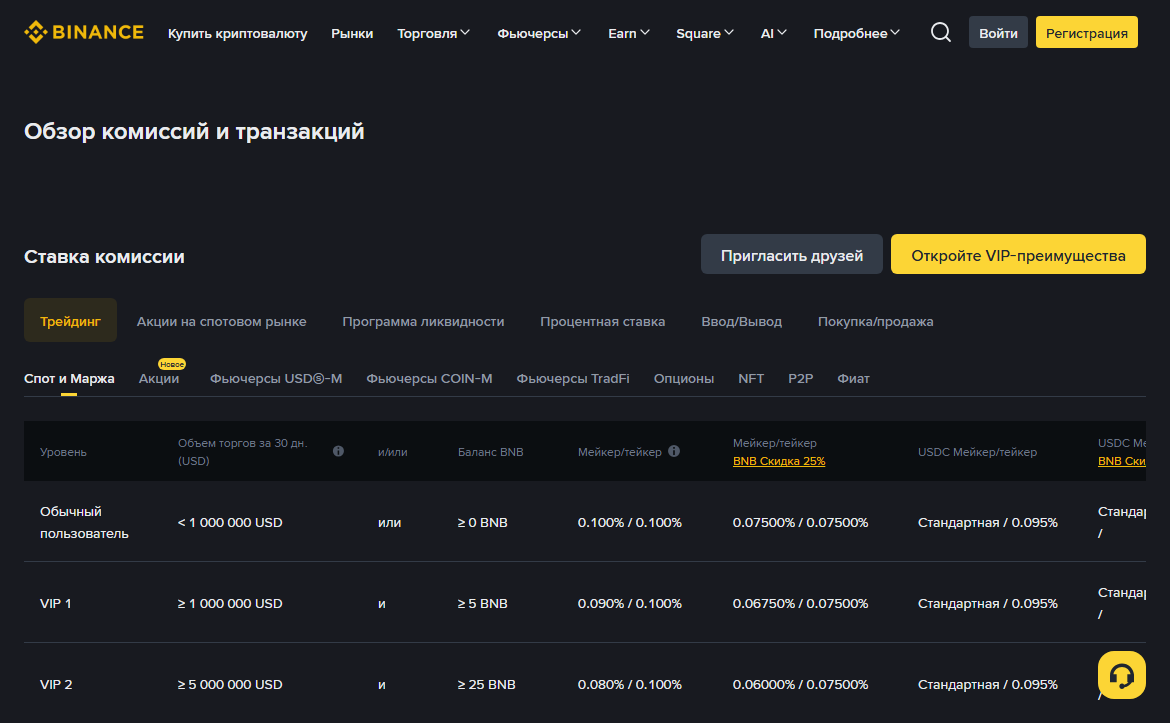
Start with the product, not a percentage you found. Open Binance's official rate page, choose the relevant section, and check the maker and taker rows. Signing in may show the applicable level more accurately than the general public table. Then compare the figure with the order preview and the actual post-execution history. [2]
Record the tab heading and selected product together with the percentage. A Spot row does not automatically describe Margin, Futures, or P2P. Then find the level actually shown for the account. Do not choose a VIP row at will or count future volume as already achieved.
Copy both rates into separate fields: maker and taker. Even if you plan a limit order, part may execute immediately and have a taker role. For an execution whose role is unknown, calculate both scenarios and decide in advance whether the higher figure is acceptable. This is more honest than choosing the lower percentage as 'expected.' A discount shown beside the table is a separate condition. Check whether the required fee-payment method is enabled, available for the selected product, and backed by enough of the relevant asset at execution. If even one condition is unconfirmed, calculate without the discount first. After the trade, compare the assumption with the actual history row.
The rate applies to filled volume, not the amount you originally intended to place. A partially filled order requires calculation from the completed rows; the unfilled remainder does not itself incur a trading fee. If fills occurred at different prices, use the actual quantities and prices for each row, or first determine the position's average price.
Preserve the units. A percentage of 0.1% becomes a decimal rate of 0.001, not 0.1. Pair volume must also not be confused with the base-asset quantity: fill value is usually obtained by multiplying quantity by price. Before calculating the total, label the asset in which each column is expressed.
The final check happens after the trade. Open the fill history and reconcile the role, volume, rate, amount, and fee asset. If the result does not match, first rule out rounding, a partial fill, and a change of level. Give support the transaction ID and arithmetic, but not your password, 2FA code, or device access.
- Name the productRecord whether the calculation applies to Spot, Margin, or another section. The same pair in different products does not imply the same fee schedule.
- Check the levelCheck the current VIP level and the conditions for determining it on the official page. Do not assume that previous volume has already been counted.
- Separate maker and takerDo not copy the rate from the neighboring column. If the role is not known in advance, calculate both scenarios.
- Confirm the discountIt counts only when enabled, available, and applicable to the specific transaction. Do not automatically subtract an expected discount.
- Save the time of the checkFor your own log, record the date, product, and source of the rate without publishing account details.
How do you calculate a trading fee?
Base model: fee = filled volume × rate. First convert the percentage to a decimal. For example, 0.08% becomes 0.0008 in the practice formula. If the hypothetical filled volume is 2,500 units of the quote asset, the calculation gives 2 units. The numbers illustrate the arithmetic and do not state a current Binance rate. [3]
| Step | Action | Practice example |
|---|---|---|
| 1 | Determine the fill value | Quantity × actual price = 2,500 |
| 2 | Convert the percentage | 0.08% = 0.08 ÷ 100 = 0.0008 |
| 3 | Multiply the volume by the rate | 2,500 × 0.0008 = 2 |
| 4 | Check the fee asset | Check the trade history |
With multiple fills, it is more reliable to calculate each row separately and add the results. This accounts for different prices and roles. For a rough estimate, you can open local fee calculator: it does not retrieve the rate from the account, so the percentage and discount must be entered manually.
Display rounding may hide lower decimal places. Do not try to derive the rate from a short row rounded to two decimal places. Use the detailed view or a history export if available, and compare values in the same units.
How to analyze a partially filled order row by row
Start with the original order, but do not use its full quantity as a ready-made fee base. Find the list of fills and create a separate row for every match. You need the actual quantity, price, role, rate, and fee asset. An open remainder counts only after it actually executes.
For each row, multiply the quantity by its price to obtain the fill value in the quote asset. Then multiply that value by the applicable decimal rate. If the interface shows the fee in another asset, do not add different units directly. First preserve the actual amounts separately and only then convert them into one valuation currency using an explicitly chosen exchange rate.
If the first part of an order crossed the book immediately while the remainder rested in it for some time, the roles may differ. The first row may be taker and a later one maker. A single 'limit order' label does not replace this check. Compare each fill with the corresponding rate column in effect for the product and account level. Verify the discount from the actual fee, not from a pre-trade expectation. If there was not enough of the separate fee-payment asset, part or all of the fee may have been charged differently. Record the setting, available balance, and history entry. Do not change the calculation after the fact merely because a smaller figure looks more familiar.
After calculating, add fees only within the same asset. The overall trading result also includes the average execution price and possibly exchange-rate movement between the assets. Do not relabel spread and slippage as a fee: they explain a price difference but are not a maker or taker rate line.
Match the calculated amount with the export or detailed history. For a small difference, first check display precision and rounding. A material discrepancy requires rechecking the role, rate, and volume. Do not try to 'fix' the formula with an arbitrary coefficient just to make it match the result.
Before contacting support, prepare a table without secrets: order ID, time, product, fill rows, rates used, and the observed discrepancy. This set lets you ask a verifiable question. A screenshot of the entire account, password, login code, and remote access are not needed to calculate a fee. Do not compare fees from two trades until you have checked that their units match. One record may show an amount in the base asset, another in the quote asset or a separate payment asset. Convert the values to one currency only for analytical comparison and save the rate used; the actual history remains the primary source for the charge.
To check your own calculation, it can be useful to ask another person to verify the formula, but you do not need to give them an account export. Create an anonymized copy containing quantity, price, role, and rate. If the arithmetic matches on those figures, look for the discrepancy in the original units and actual settings rather than in access to the profile.
Which asset is the fee charged in?
The fee amount and fee asset must be checked in the trade details. Depending on settings and conditions, the fee may appear in the received asset, spent asset, or a separate available asset. A simple comparison of starting and ending balances can therefore produce the wrong explanation.
If a separate asset is used to pay fees, check whether there was enough of it at the time of execution and whether the relevant setting actually applied. If the balance was insufficient, the transaction may have been calculated differently. Do not draw a conclusion from the current balance several days later: other movements may have occurred between the trade and your review.
Why did I receive less than the quantity purchased?
One possible reason is that the fee was deducted from the received asset. Another may be unrelated to the fee: the order may have filled only partially. First reconcile the requested quantity, the amount of each fill, the remainder status, and the separate fee row.
Which costs must not be mixed with the trading fee?
| Cost or effect | Where it arises | How to check |
|---|---|---|
| Trading fee | When an order executes | Trade history and maker/taker rate |
| Spread | Between the best bid and ask | Order book before submission |
| Slippage | When executing across several levels | Average price versus expected price |
| Network fee | For an on-chain withdrawal or transfer | Network screen and withdrawal total |
| Borrowing interest | In a product that involves borrowing | Terms of the relevant product |
| Funding | In certain derivatives products | History and contract rules |
Saving the small difference between maker and taker does not prove that the order was more economical. While a passive order waits, the price may move away, the order may fill partially, and spread or slippage may exceed the fee difference. Compare the transaction's full outcome, not one percentage.
How do you reconcile the actual charge after a trade?
The fill history is the main factual source for a transaction that has already occurred. Open the relevant trading section, set a narrow period, and find the order by pair, time, and ID. Then expand all fills.
- check the Buy or Sell side and the correct trading pair;
- match the quantity and price of each row;
- check the maker or taker role, if shown;
- record the fee amount and fee asset;
- check for a partial fill and canceled remainder;
- compare the applied rate with the official schedule on the transaction date.
When contacting support, it is enough to provide the transaction ID and describe the discrepancy through the account's official channel. A password, one-time code, 2FA backup key, and remote access are not required for an arithmetic check. Treat the export as a financial document and remove personal fields before publishing it.
How do you build a verifiable calculation worksheet?
Separate the inputs, formula, and actual result. In the first section, record the product, pair, side, order ID, and time. In the second, create a separate row for each fill: quantity, price, value, role, and rate. In the third, copy the fee amount and fee asset from the history.
Use the same structure for buying and selling, but do not interpret the balance the same way. In a purchase, the base asset arrives and the quote asset is spent. In a sale, the reverse occurs. If the fee is deducted from the incoming asset, the net amount received is reduced. If it is charged separately, the movement will appear in another balance.
| Field | Where to find it | Why save it |
|---|---|---|
| Product and pair | Trading-form heading | Keep different rates and units separate |
| Execution time | Trade history | Match the rate and level on the date |
| Quantity and price | Each fill row | Reconstruct the actual volume |
| Maker or taker | Details or export | Choose the correct rate column |
| Fee and asset | Actual record | Compare the calculation with the charge |
If the interface does not show the role, do not infer it only from the order name. Gather the details and ask official support a narrow question about the specific ID. A clear worksheet helps distinguish a real rate error from a partial fill, rounding, or an incorrect unit.
Should you always seek a maker role?
No; the role should match the execution objective and acceptable risk. A passive limit order provides control over the price boundary but may not execute. An immediate order increases the likelihood of execution when liquidity is sufficient, but the final average price is not fixed in advance.
Before submitting, determine what matters for the transaction: speed, price boundary, full quantity, or the ability to cancel the remainder. Then study the book, position size, and form parameters. Do not enable an unfamiliar setting solely for a lower fee. Order mechanics are covered in detail in the guide about market and limit orders on Binance Spot.
Five mistakes in a maker/taker calculation
- Treat every Limit order as maker. A limit price can cross the book and produce a taker fill.
- Assign one role to the entire order. Parts of an order may execute at different times and appear as separate rows.
- Use a public rate without the account. The applicable level, product, and conditions may differ.
- Confuse the fee with the spread. Both affect the outcome, but they are calculated and checked from different data.
- Compare assets as if they were identical units. The fee may be charged in a currency other than the one in which you mentally calculated the cost.
Frequently asked questions
Is a market order always a taker?
Its purpose is immediate execution against available liquidity, so on a regular book it is a taker. Still check the history and rules of the selected product for the actual trade.
Will a limit order at the current price be a maker?
Not necessarily. What matters is not the current-price label but the position relative to opposing offers when the order is accepted. If a buy can match an ask or a sale can match a bid, the fill will remove liquidity.
Can you know the exact fee before the trade?
You can estimate a scenario from the current rate, expected role, and volume. The result is confirmed after execution, when the prices, order portions, role of each row, rounding, and fee asset are known.
Is the discount already included in the public table?
The page may have separate columns or conditions. Do not automatically choose the most favorable figure. Sign in to the account, check the active setting, and verify that it applies to the product.
Why does my arithmetic differ in a few lower decimal places?
Possible explanations include display rounding, multiple fills, or calculation in another asset. Repeat the calculation from the detailed rows at higher precision, then compare the total in one unit.
Official sources to check
Sources checked on August 8, 2026. Take rates, levels, and product terms from the current Binance screen.